
Resurface - Convert surfaces to studs and more
Plugin by cxmeels ✓ · 97% positive · 5,000 votes
Free
Get on Creator Store →
This is an official Roblox Creator Store asset. The button opens its page on create.roblox.com, where you get it into your inventory or Studio. Roblox Modules does not sell, host or redistribute Roblox assets.


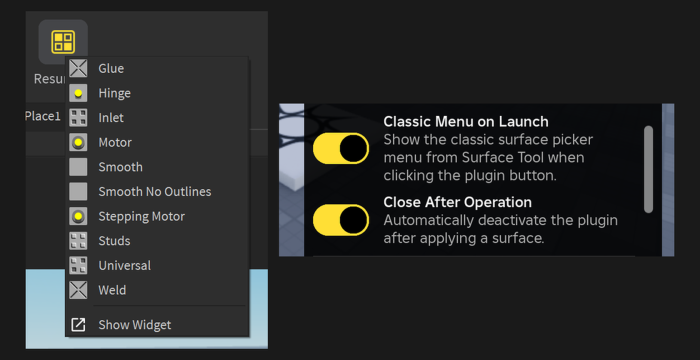
Bring the surface tool back to Studio! Resurface returns the original surface tool back to Studio via the Plugins tab. https://devforum.roblox.com/t/1226536 -- Installation -- If you obtained Resurface via the Creator Store, you will need to head to Toolbox → Inventory → My Plugins and install it from there inside of Studio. With Resurface, you can convert surfaces between studs, inlets, universal, welds and more just like before, all from a handy little menu. Built-in keyboard shortcuts allow you to apply to multiple faces and parts, or all at once, and allow you to summon the tool to wherever your cursor is!
| Type | Plugins |
|---|---|
| Creator | cxmeels ✓ |
| Price | Free |
| Rating | 97% positive · 5,000 votes |
| Contains scripts | Yes |
| Category | Plugins › Building |
| Published | 2020-05-22 |
| Updated | 2025-11-19 |
| Roblox ID | 5070921519 |
| Last checked | 2026-09-08 |















![Moon Animator 2 [sale!]](https://tr.rbxcdn.com/180DAY-bb0f21c27b952011c4b81408cde773f1/420/420/Image/Png/noFilter)









