Setting UI System
Model by ruralbob1178 ✓ · 0 upvotes
$4.99
Get on Creator Store →
This is an official Roblox Creator Store asset. The button opens its page on create.roblox.com, where you get it into your inventory or Studio. Roblox Modules does not sell, host or redistribute Roblox assets.

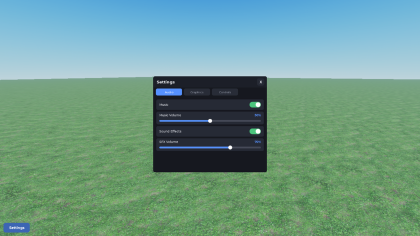


Settings Menu A tabbed settings menu for music/SFX volume, graphics quality, and rebindable keys. The server validates and saves every change; the client applies it live. Pre-built UI you re-skin in Studio. Features - Audio: music/SFX toggles and volume sliders driving SoundGroups - Graphics: quality dropdown and a Shadows toggle (Lighting.GlobalShadows) - Controls: rebindable keys with live remap and a simple input API - Persists per player; every setting and default is in one Config Works with your game - Route sounds to the Music/SFX SoundGroups - Bind actions with the Keybinds module - Read graphics quality from an attribute or change signal - Save with its own DataStore or your own system Requirements - Pure Roblox APIs, no dependencies or paid plugins - A DataStore or your own save system Setup Drag the folders into the matching services, route your sounds, bind your actions. Steps in the README.
| Type | Models |
|---|---|
| Creator | ruralbob1178 ✓ |
| Price | $4.99 |
| Rating | 0 upvotes |
| Contains scripts | Yes |
| Category | Gameplay › Utilities |
| Object types | Gear, Symbol |
| Instances | 2 decal, 3 script |
| Published | 2026-06-03 |
| Updated | 2026-06-04 |
| Roblox ID | 110794663628130 |
| Last checked | 2026-09-13 |