EZ UI
Plugin by DingusOwnsRoblox ✓ · 0 upvotes
Free
Get on Creator Store →
This is an official Roblox Creator Store asset. The button opens its page on create.roblox.com, where you get it into your inventory or Studio. Roblox Modules does not sell, host or redistribute Roblox assets.

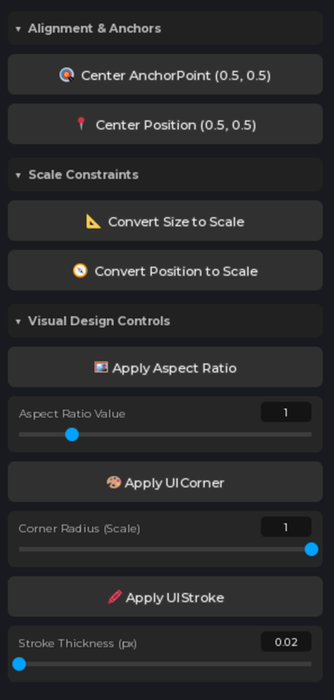
EZ UI — skip the setup, jump straight into styling. Every UI you build starts the same way. Center the frame. Convert offset to scale. Add a UICorner. Add a UIStroke. Lock the aspect ratio. That's the same boring ten minutes before you've made a single actual design decision. EZ UI collapses all of it into a panel of buttons so you can get to the part that matters. What's included Centering — snap any GuiObject dead center in its parent, no math, no anchor point fiddling Autoscaling — convert Offset to Scale so your UI holds its layout on every screen size instead of breaking on phones UIStroke editing — add and adjust strokes without digging through the Properties window Rounding — apply UICorner and set your radius in one click Aspect ratio constraints — add UIAspectRatioConstraint so elements keep their shape instead of stretching Why devs use it UI setup is the least creative part of Roblox development, and it's the part you repeat on every single frame you make. This turns fi
| Type | Plugins |
|---|---|
| Creator | DingusOwnsRoblox ✓ |
| Price | Free |
| Rating | 0 upvotes |
| Contains scripts | Yes |
| Category | Plugins › User Interface |
| Published | 2026-08-10 |
| Updated | 2026-08-10 |
| Roblox ID | 135308471009321 |
| Last checked | 2026-09-09 |


![UltraWorks Shop Creator [Pro tools]](https://tr.rbxcdn.com/180DAY-c8f431d61dbacc6f02bc8a0db5b29965/420/420/Image/Png/noFilter)






![Moon Animator 2 [sale!]](https://tr.rbxcdn.com/180DAY-bb0f21c27b952011c4b81408cde773f1/420/420/Image/Png/noFilter)







