
Exact UI: AutoScale & Smart Anchor
Plugin by A4THU4O800 ✓ · 0 upvotes
Free
Get on Creator Store →
This is an official Roblox Creator Store asset. The button opens its page on create.roblox.com, where you get it into your inventory or Studio. Roblox Modules does not sell, host or redistribute Roblox assets.
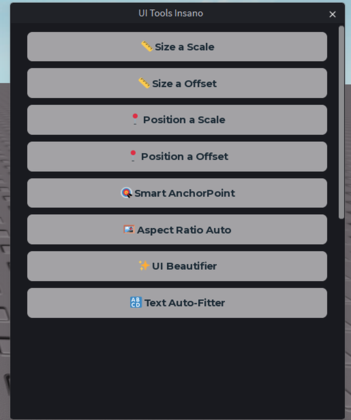
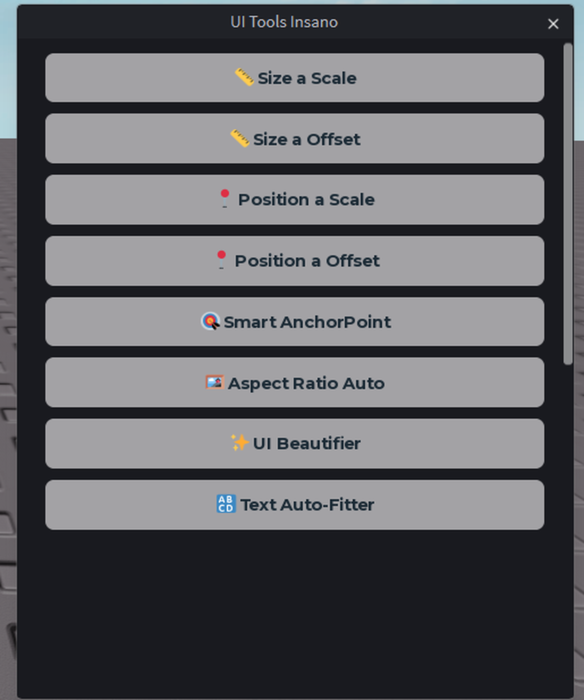
📏 Ultra-Precision Conversion (Offset to Scale) Convert your UI elements to Scale with a single click. The plugin recursively scans your UI hierarchy to calculate the exact relative size, ensuring perfect mathematical precision even if your objects are nested inside multiple Folders. You can convert Size, Position, or both at the same time! 🎯 Smart AnchorPoints (Zero Shifting) Do you hate changing the AnchorPoint to (0.5, 0.5) only to watch your button fly off to the other side of the screen? The Smart Anchor feature automatically compensates for the visual position. The AnchorPoint changes, but your object stays exactly where you left it. ✏️ Custom Pinpoint Precision Includes a manual X and Y input panel to apply completely custom AnchorPoints (e.g., 0.2, 0.8) with the exact same smart visual compensation. Completely free for the community. If this tool saves you hours of work, consider using the support button inside the plugin!
| Type | Plugins |
|---|---|
| Creator | A4THU4O800 ✓ |
| Price | Free |
| Rating | 0 upvotes |
| Contains scripts | Yes |
| Category | Plugins › User Interface |
| Published | 2026-04-21 |
| Updated | 2026-09-20 |
| Roblox ID | 137183541929829 |
| Last checked | 2026-09-24 |


![UltraWorks Shop Creator [Pro tools]](https://tr.rbxcdn.com/180DAY-c8f431d61dbacc6f02bc8a0db5b29965/420/420/Image/Png/noFilter)






![Moon Animator 2 [sale!]](https://tr.rbxcdn.com/180DAY-bb0f21c27b952011c4b81408cde773f1/420/420/Image/Png/noFilter)







