
The Materials and Surfaces Multi-Tool
Plugin by Brutez_BrightBeat ✓ · 0 upvotes
$4.99
Get on Creator Store →
This is an official Roblox Creator Store asset. The button opens its page on create.roblox.com, where you get it into your inventory or Studio. Roblox Modules does not sell, host or redistribute Roblox assets.

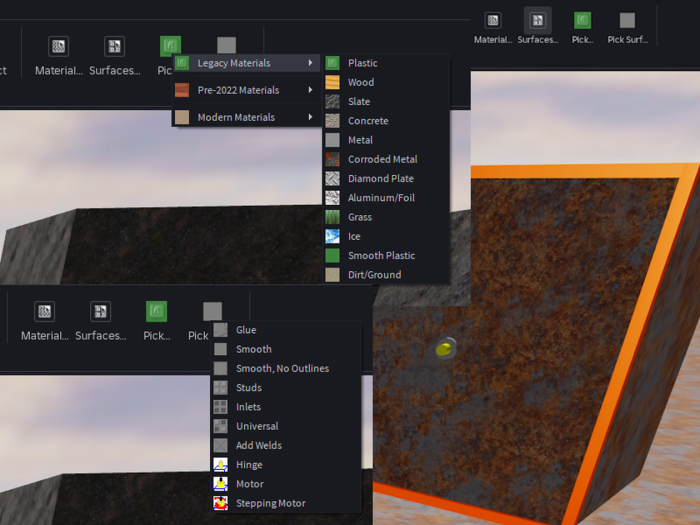
I made this plug-in since the Surfaces ribbon is hidden by default, which got a bit annoying... Change BaseParts' materials and surfaces with the click of a mouse! Choose from all available materials, including the hidden ones. Select the clickers to apply your changes to BaseParts in Workspace. Hotkeys: • Click - Apply changes to BasePart • Click + Shift - Apply changes to BasePart and its descendants • Click + Alt - Apply selected SurfaceType to all BasePart normals • Click + Shift + Alt - Apply all changes to BasePart and its descendants
| Type | Plugins |
|---|---|
| Creator | Brutez_BrightBeat ✓ |
| Price | $4.99 |
| Rating | 0 upvotes |
| Contains scripts | Yes |
| Category | Plugins › Building |
| Published | 2025-09-17 |
| Updated | 2025-09-18 |
| Roblox ID | 140055995967599 |
| Last checked | 2026-09-08 |
All assets by Brutez_BrightBeat · Brutez_BrightBeat on Roblox












![Moon Animator 2 [sale!]](https://tr.rbxcdn.com/180DAY-bb0f21c27b952011c4b81408cde773f1/420/420/Image/Png/noFilter)









