Texture Drag
Plugin by grif_0 ✓ · 69% positive · 30 votes
Free
Get on Creator Store →
This is an official Roblox Creator Store asset. The button opens its page on create.roblox.com, where you get it into your inventory or Studio. Roblox Modules does not sell, host or redistribute Roblox assets.
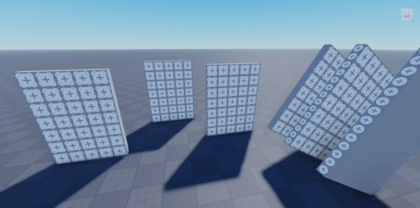

This plugin allows you to drag all of the textures on the face of a part around like you were to drag a part in studio, respecting size increment in studio. This pluginuses Studio's Shortcuts menu to enable/disable the functionallity. To add / change your keybind, go to: File > Advanced > Customize Shortcuts and search "Texture" This is one of a few Texture related plugins I have made. Check out the others here: https://create.roblox.com/store/asset/16481391658/notgrif-Texture-Delete
| Type | Plugins |
|---|---|
| Creator | grif_0 ✓ |
| Price | Free |
| Rating | 69% positive · 30 votes |
| Contains scripts | Yes |
| Category | Plugins › Building |
| Published | 2024-02-22 |
| Updated | 2024-03-26 |
| Roblox ID | 16481416095 |
| Last checked | 2026-09-08 |












![Moon Animator 2 [sale!]](https://tr.rbxcdn.com/180DAY-bb0f21c27b952011c4b81408cde773f1/420/420/Image/Png/noFilter)









