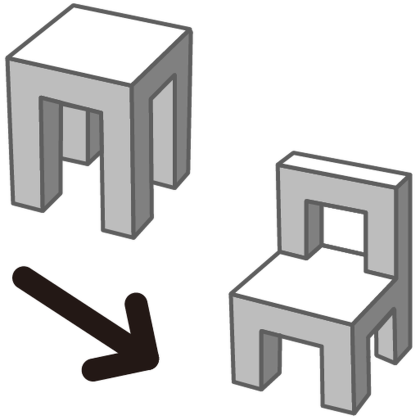
Objects Replacement Tool
Plugin by NeXtreme Studio ✓ · 0 upvotes
Free
Get on Creator Store →
This is an official Roblox Creator Store asset. The button opens its page on create.roblox.com, where you get it into your inventory or Studio. Roblox Modules does not sell, host or redistribute Roblox assets.
オブジェクト(パーツ、ユニオン、モデル)を別のオブジェクトに置き換えるツールです。 操作方法 1. プラグインのボタンを押す。 2. 置き換える先のオブジェクトを選択する。複数選択可能。 3. 「1. 置き換え先を選択して、クリック」を押す。 4. 置き換える元のオブジェクトを選択する。ひとつのみ選択可能。 5. 「2. 置き換え元を選択して、クリック」を押す。 6. 置き換えられる。 留意事項 - オブジェクトの位置は、ピボットの位置が基準になります。 - オブジェクトの向きは、オブジェクトのローカル座標が基準になります。 This tool enables you to replace objects (parts, unions, models) with alternative objects. Instructions: 1. Click the plugin button. 2. Select the object(s) you want to replace. You can select multiple objects. 3. Click "1. 置き換え先を選択して、クリック". 4. Select the object you wish to replace. Only one selection is allowed. 5. Click "2. 置き換え元を選択して、クリック". 6. The replacement is then executed. Please note: - The position of the object is determined by the pivot point. - The orientation of the object is based on its local coordinates.
| Type | Plugins |
|---|---|
| Creator | NeXtreme Studio ✓ |
| Price | Free |
| Rating | 0 upvotes |
| Contains scripts | Yes |
| Category | Plugins › Building |
| Published | 2024-05-03 |
| Updated | 2024-11-15 |
| Roblox ID | 17367520419 |
| Last checked | 2026-09-08 |












![Moon Animator 2 [sale!]](https://tr.rbxcdn.com/180DAY-bb0f21c27b952011c4b81408cde773f1/420/420/Image/Png/noFilter)









