Catalog Browser
Plugin by peroline103 ✓ · 0 upvotes
$4.99
Get on Creator Store →
This is an official Roblox Creator Store asset. The button opens its page on create.roblox.com, where you get it into your inventory or Studio. Roblox Modules does not sell, host or redistribute Roblox assets.

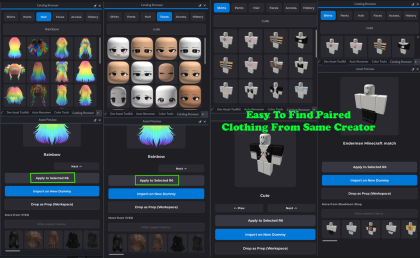

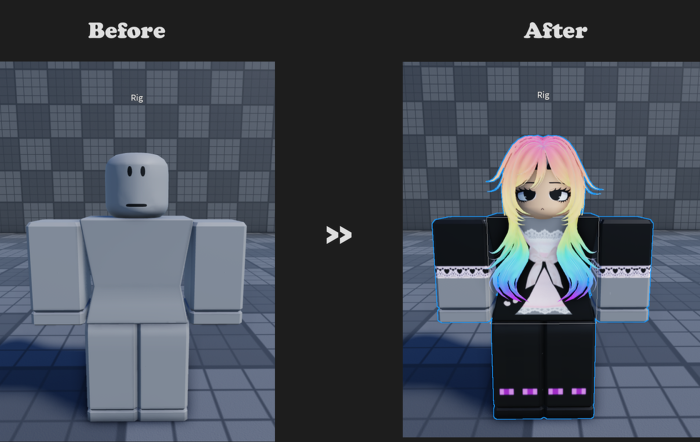


Bring the Marketplace to Studio! Stop switching tabs! Catalog Browser lets you instantly search, preview, and import marketplace assets without ever leaving your workspace. Search by keyword or ID, browse specific creators, and seamlessly apply items directly to R6 rigs or drop them as physical props. Speed up your workflow and build better games, faster! Quick Tutorial 1. Search: Open the plugin, select a category (Shirts, Hair, etc.), and search using a keyword or exact Asset/Bundle ID. 2. Preview: Click any result to view it. Pro tip: Scroll down in the preview window to explore more items made by that same creator! 3. Import: Choose exactly how you want to spawn the asset: Import on New Dummy: Instantly spawns a fresh R6 dummy wearing the item. Apply to Selected R6: Select any R6 rig in your Workspace, then click this to equip the asset to them. Drop as Prop: Drops the raw item into your world to use as a model (Forgot what you imported yesterday? Check the History tab!)
| Type | Plugins |
|---|---|
| Creator | peroline103 ✓ |
| Price | $4.99 |
| Rating | 0 upvotes |
| Contains scripts | Yes |
| Category | Plugins › Workflow |
| Published | 2026-04-21 |
| Updated | 2026-04-21 |
| Roblox ID | 95462115138004 |
| Last checked | 2026-09-24 |












![Moon Animator 2 [sale!]](https://tr.rbxcdn.com/180DAY-bb0f21c27b952011c4b81408cde773f1/420/420/Image/Png/noFilter)







