
Invisible Frame Select/Drag Tool - Better Select
Plugin by ailenkai ✓ · 0 upvotes
Free
Get on Creator Store →
This is an official Roblox Creator Store asset. The button opens its page on create.roblox.com, where you get it into your inventory or Studio. Roblox Modules does not sell, host or redistribute Roblox assets.
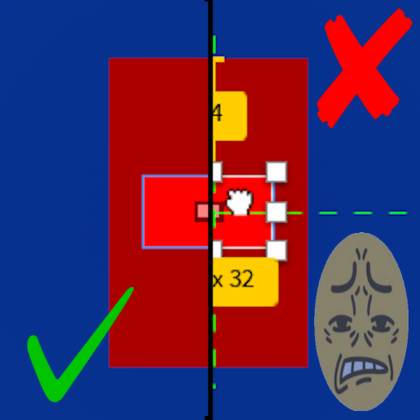
Allows you to click on frames with transparency of 1 and move them around, all you do is click the button and select the gui elements just like you would normally. (you can select and drag invisible frames) Not limited to just frames but also, ImageButton, ImageLabel, ScrollingFrame, TextBox, TextButton, TextLabel, CanvasGroup, etc. Anything that's a GuiObject. Click to select GUI elements, automatically choosing the topmost nested object. Hold Ctrl to add or remove multiple GUI elements from your selection. Use numpad + and - keys to move up and down the GUI hierarchy.
| Type | Plugins |
|---|---|
| Creator | ailenkai ✓ |
| Price | Free |
| Rating | 0 upvotes |
| Contains scripts | Yes |
| Category | Plugins › Workflow |
| Published | 2025-01-23 |
| Updated | 2025-01-23 |
| Roblox ID | 101075227974620 |
| Last checked | 2026-09-08 |
![Mirror Parts [V2.1]](https://tr.rbxcdn.com/180DAY-298f3d6310c197f4b2d4201e754e53bb/420/420/Image/Png/noFilter)
![Quick GUI Scale w/ Slider [OUTDATED]](https://tr.rbxcdn.com/180DAY-dc2747983f3f347c880791a95e8a8a73/420/420/Image/Png/noFilter)












![Moon Animator 2 [sale!]](https://tr.rbxcdn.com/180DAY-bb0f21c27b952011c4b81408cde773f1/420/420/Image/Png/noFilter)







